Chatbots and AI agents can look the same: you type a request and the software replies. Many products now call themselves agents, so the difference has become hard to see. It comes down to what the software is allowed to do: a chatbot answers, an agent acts. This guide explains both, shows where the line falls with real requests, and covers the risks and the costs. TechNamah builds both, and we often recommend the simpler one. Gartner’s research quoted here was read on gartner.com on 6 November 2026.
What is the difference between an AI agent and a chatbot?
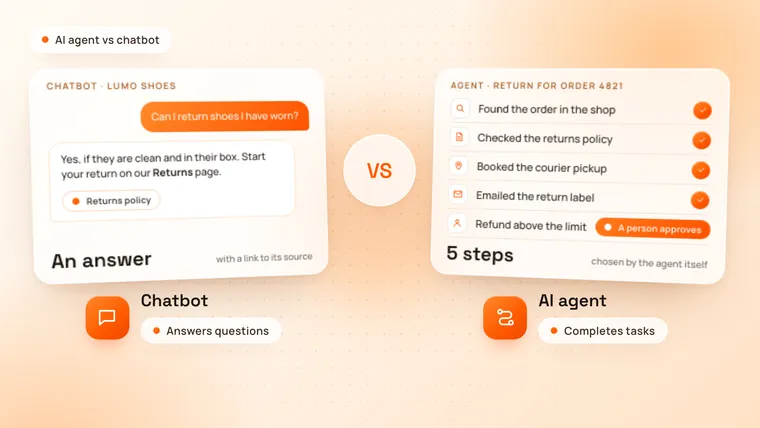
A chatbot answers questions in a conversation; an AI agent completes tasks. Ask a chatbot about returning a pair of shoes and it explains the returns policy. Ask an agent and it finds your order, creates the return, books the courier and emails you the label.
The real difference is who decides the next step. A chatbot replies to each message and waits for the next one. An agent is given a goal, then plans the steps, uses tools, checks each result and keeps going until the task is done or it needs a person.
| Chatbot | AI agent | |
|---|---|---|
| What it does | Answers questions in a conversation | Completes a task towards a goal |
| What starts it | A message from a person | A message, an event such as a new order, or a schedule |
| How it works | Replies to each message, from a script or an AI model | Plans the steps, uses tools, checks the results and continues |
| What it connects to | Your content: FAQs, documents, help centre | Your systems: CRM, calendar, database, email, APIs |
| What you get | An answer, often with a link to its source | A finished task: a booking made, a record updated, a refund prepared |
| When it goes wrong | A wrong or unhelpful answer | A wrong action in a real system |
| Best for | Questions with a known answer | Work with several steps across your tools |
What is a chatbot?
A chatbot is software that answers people’s messages in a conversation, on a website, in an app or on WhatsApp. There are two kinds:
- Rule-based chatbots follow a script: buttons, menus and fixed replies that someone wrote in advance. They are predictable and cheap, but they cannot handle a question nobody planned for.
- AI chatbots understand questions in any words and reply in full sentences, using an AI model. The useful ones answer from your own content, such as your help centre, product documents or policies, and link to the source. That method is called retrieval-augmented generation, and our guide to what RAG is explains how it works.
An AI chatbot is the right tool when the answer already exists in your content and the customer only needs to find it: opening hours, delivery options, how a feature works, what a plan includes. It answers at any hour and hands the conversation to a person when it cannot help.
What is an AI agent?
An AI agent is software that uses an AI model to work towards a goal: it decides the next step, uses tools such as search, your CRM or your database, checks the result and continues until the task is done or it needs a person. Each tool is a connection to one of your systems, such as reading an order, booking a slot in a calendar or sending an email, and the tools are what let the agent act.
Take a customer who wants to return a pair of shoes. A returns agent could:
- Find the order from the customer’s email address and check that it is still within the return period.
- Check the returns policy for that product.
- Create the return in the shop system and book the courier pickup.
- Email the customer the label and update the support ticket.
- Ask a person to approve the refund if it is above a set amount.
Nobody scripted those steps for every case. The agent works out what to do from the goal, its tools and what it finds, so a different case, such as an order outside the return period, leads to different steps.
Is a chatbot that can take actions an AI agent?
Not quite. Many chatbots can now do one thing in a system when asked, such as looking up an order or booking an appointment. That makes them more useful, but a developer still decided which action follows which request. An AI agent decides the steps itself, within the limits you set.
It helps to see four levels, from the simplest to the most independent:
| Level | What it does | Who decides the next step | Example |
|---|---|---|---|
| 1. Rule-based chatbot | Answers from a script of buttons and fixed replies | The script | A menu of delivery and returns questions |
| 2. AI chatbot | Answers questions in any words, from your content | The customer, with each new message | “Can I return shoes I have worn?” |
| 3. AI chatbot with actions | Also does one task in a system when asked | The developer, who linked each request to one action | “Where is my order?”, answered from the order system |
| 4. AI agent | Plans and completes a task over several steps with tools | The AI model, within your limits and approvals | Processing a return from start to finish |
Products sold as AI agents can sit at any of these levels. Gartner calls the rebranding of chatbots and other existing products as agents “agent washing”, and estimates that only about 130 of the thousands of agentic AI vendors are real (Gartner, June 2025). When you compare products, ask what the software can do on its own, not what it is called.
Which one does your business need?
Take the requests you want to automate one at a time and ask four questions:
- Does a good answer end the request? Then a chatbot is enough, and it is cheaper, faster and easier to control than an agent.
- Does it need one change in one system, such as a booking or an order lookup? Then a chatbot with that action will do.
- Does it take several steps, or decisions that depend on what it finds? That is work for an agent.
- What does a mistake cost? The more a wrong action would cost, the more the agent should ask a person before it acts, and the more you should test it first.
| Request | What fits | Why |
|---|---|---|
| “What are your opening hours?” | AI chatbot | The answer is already in your content |
| “Does the Pro plan include API access?” | AI chatbot | One answer from your pricing page or documents |
| “Where is my order?” | AI chatbot with one action | It reads one record and replies |
| “Book me a demo next Tuesday.” | AI chatbot with one action | One booking in your calendar |
| “I want to return these shoes.” | AI agent | Several steps across the shop, the courier and email, with a person approving larger refunds |
| A new lead fills in your contact form | AI agent | It researches the company, scores the lead, updates your CRM and drafts a reply for a person to send |
| “Find 20 companies like our best customers.” | AI agent | It searches, compares and writes the list into your CRM |
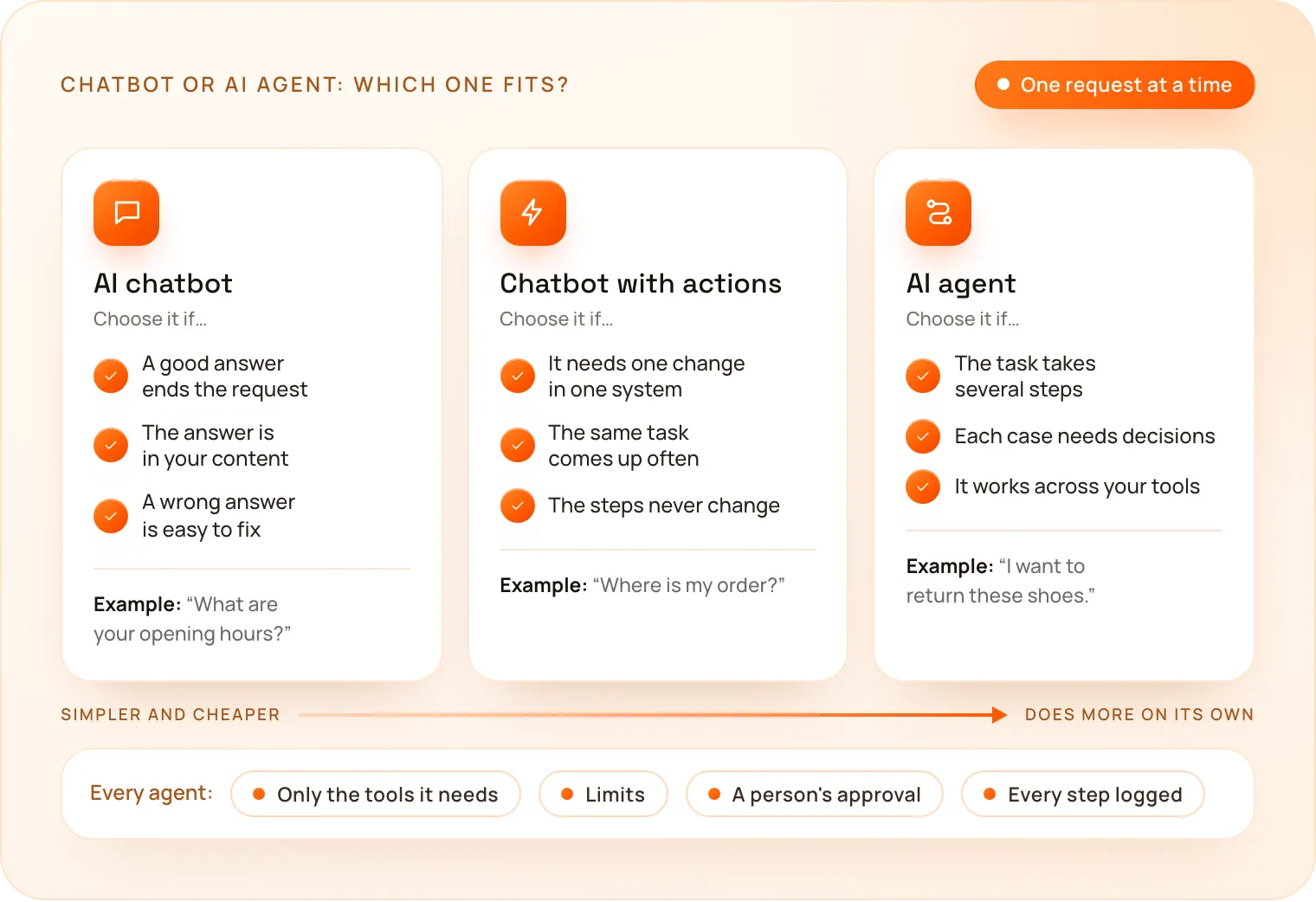
If most of your requests are questions, start with a chatbot and add actions where customers keep asking for the same task. Gartner makes the same point: “Many use cases positioned as agentic today don’t require agentic implementations.” It recommends agents where decisions are needed, automation for routine workflows and assistants for simple retrieval.
Can a chatbot and an AI agent work together?
Yes, and in most businesses they should. The chatbot is the front door: it talks to the customer, answers what it can and works out what they want. When a request needs work done, it hands the task to an agent behind the scenes, and a person handles the exceptions.
A customer asks the chatbot on your website whether worn shoes can be returned, and it answers from your returns policy. When the customer says they want to return them, it passes the order to a returns agent, which does the steps above and asks your team to approve the refund if it is above your limit. The customer stays in one conversation the whole time.
This also lets you start small: launch the chatbot first, see which tasks customers ask for most, and add an agent for those. Gartner finds that support teams mostly use AI this way, to take on more work rather than to replace people: in its survey of 275 service and support leaders in July and August 2026, only 21% said their organisation had reduced its number of human support agents because of AI (Gartner, November 2026).
What are the risks of AI agents?
An agent’s mistakes happen in your systems, not only in a reply: a wrong refund, a changed record or an email to the wrong person. A chatbot’s worst mistake is usually a wrong or unhelpful answer, which a person can correct.
Many agent projects also fail before they pay off. Gartner predicts that over 40% of agentic AI projects will be cancelled by the end of 2027 because of escalating costs, unclear business value or inadequate risk controls (Gartner, June 2025).
These are the rules we follow to keep an agent safe and worth its cost:
- One clear job first. Start with a single task that has a clear result, such as processing returns, not “handle customer service”.
- Only the tools and data it needs. An agent that books appointments has no access to payments.
- Limits. Caps on amounts, on the number of actions in one run and on who it can contact.
- A person approves what matters, such as refunds above a set amount or anything sent to a client.
- Every step logged, so you can see what it did and why, and fix what went wrong.
- Tested on real cases before launch, with the failures fixed. The agent earns more freedom as it proves itself on real work.
Does an AI agent cost more than a chatbot?
Yes, usually, both to build and to run. An agent connects to more systems, needs approvals, limits and logs, and takes more testing, because its mistakes cost more.
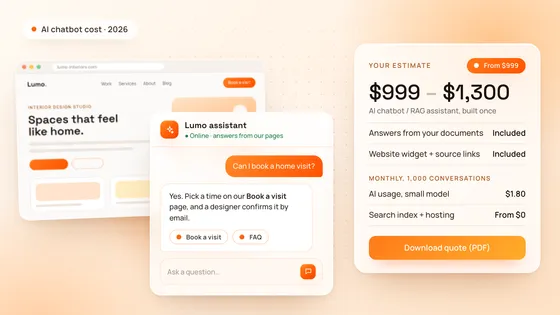
At TechNamah, a custom AI chatbot that answers from your documents starts at $999, with a website widget and source links. We do not publish a price for AI agents: each one depends on the systems it connects to, the actions it takes and the approvals it needs, so we quote it after a free 30-minute strategy call.
Running costs differ too. A chatbot usually calls the AI model once for each answer. An agent calls it several times for each task: to plan, after each tool it uses and to check the result, so the same model costs more per task. Our guide to how much an AI chatbot costs works out a chatbot’s monthly running costs, and our cost calculator gives you a price range for one instantly.
Will AI agents replace chatbots?
Not for answering questions. Agents will spread quickly inside business software: Gartner predicts that 33% of enterprise software applications will include agentic AI by 2028, up from less than 1% in 2024, and that at least 15% of day-to-day work decisions will be made autonomously through agentic AI by 2028, up from 0% in 2024. But a question with a known answer does not need an agent. A chatbot answers it faster, at a lower cost and more predictably, so we expect most businesses to keep a chatbot in front and add agents behind it.
How does TechNamah build chatbots and AI agents?
TechNamah builds both. Our AI chatbot development service builds assistants that answer from your own content on your website, on WhatsApp or in the tools you already use, and hand over to your team when a person is needed. Our AI agent development service builds agents for research, sales prospecting and operations, connected to your tools through APIs and MCP, with approvals, limits and a log of every step.
Every project starts with a free 30-minute strategy call, where we look at the requests you want to automate and tell you plainly if a chatbot will do. You see a first prototype working on real examples within 72 hours, and once the project is paid in full, the code, prompts and documentation are yours. Book a free strategy call: we reply to every request within 24 hours. Our AI services page shows everything we build.